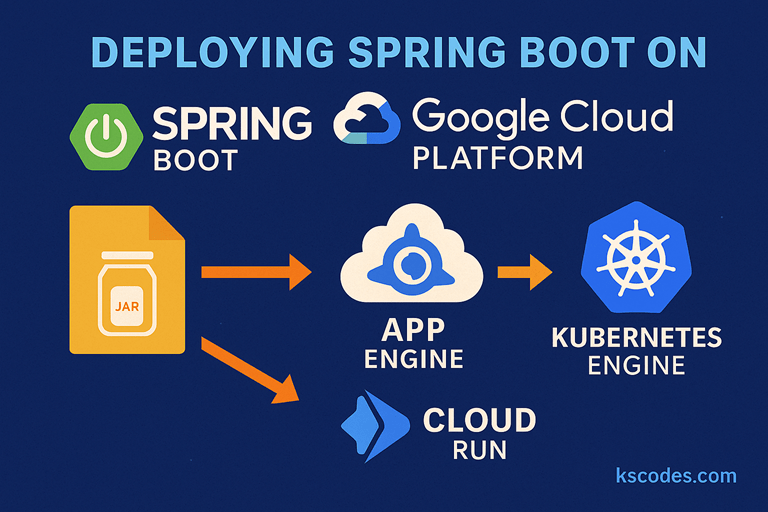
Google Cloud Platform (GCP) offers multiple managed and containerized solutions to deploy Spring Boot applications at scale. Whether you prefer App Engine (PaaS), Cloud Run (serverless), or GKE (Kubernetes), GCP has you covered.
In this post, we’ll cover three ways to deploy a Spring Boot app on GCP:
- App Engine Standard
- Cloud Run with Docker
- Kubernetes Engine (GKE)
We’ll use com.kscodes.springboot.containers as our sample package for all examples.
🧰 Prerequisites
Before starting:
- A GCP project with billing enabled
gcloudCLI installed and authenticated- Docker installed (for Cloud Run and GKE)
- Maven or Gradle build system
- A basic Spring Boot app (
.jaror Docker)
1️⃣ Deploying to App Engine Standard
App Engine is a fully managed platform. No infrastructure to manage—just deploy.
🛠️ Step 1: Prepare Your Spring Boot App
Ensure your app listens on port 8080:
package com.kscodes.springboot.containers;

import org.springframework.web.bind.annotation.GetMapping;
import org.springframework.web.bind.annotation.RestController;

@RestController
public class HelloController {
    @GetMapping("/")
    public String greet() {
        return "Hello from GCP App Engine!";
    }
}
📁 Step 2: Add app.yaml
# app.yaml
runtime: java21
instance_class: F1
env_variables:
  SPRING_PROFILES_ACTIVE: "gcp"
📦 Step 3: Deploy to App Engine
Package your app:
./mvnw clean package -DskipTests
Deploy:
gcloud app deploy target/*.jar
Visit:
gcloud app browse
2️⃣ Deploying to Cloud Run (Serverless Containers)
Cloud Run allows containerized apps to run with auto-scaling and pay-per-use pricing.
🐳 Step 1: Dockerfile
FROM eclipse-temurin:21-jdk
WORKDIR /app
COPY target/*.jar app.jar
EXPOSE 8080
ENTRYPOINT ["java", "-jar", "app.jar"]
⚙️ Step 2: Build and Push Container
gcloud builds submit --tag gcr.io/YOUR_PROJECT_ID/springboot-app
🚀 Step 3: Deploy to Cloud Run
gcloud run deploy springboot-service \
  --image gcr.io/YOUR_PROJECT_ID/springboot-app \
  --platform managed \
  --region us-central1 \
  --allow-unauthenticated
Access URL provided after deploy.
3️⃣ Deploying to Google Kubernetes Engine (GKE)
GKE gives full control over Kubernetes deployments.
🧱 Step 1: Enable GKE & Create Cluster
gcloud container clusters create springboot-cluster \
  --zone us-central1-a --num-nodes=2
gcloud container clusters get-credentials springboot-cluster --zone us-central1-a
🐳 Step 2: Docker Build and Push
docker build -t gcr.io/YOUR_PROJECT_ID/springboot-gke .
docker push gcr.io/YOUR_PROJECT_ID/springboot-gke
📄 Step 3: Kubernetes Deployment YAML
apiVersion: apps/v1
kind: Deployment
metadata:
  name: springboot-app
spec:
  replicas: 2
  selector:
    matchLabels:
      app: springboot
  template:
    metadata:
      labels:
        app: springboot
    spec:
      containers:
        - name: springboot
          image: gcr.io/YOUR_PROJECT_ID/springboot-gke
          ports:
            - containerPort: 8080
kubectl apply -f deployment.yaml
🌐 Step 4: Expose via LoadBalancer
apiVersion: v1
kind: Service
metadata:
  name: springboot-service
spec:
  type: LoadBalancer
  selector:
    app: springboot
  ports:
    - protocol: TCP
      port: 80
      targetPort: 8080
kubectl apply -f service.yaml
kubectl get service
⚖️ Which Option to Choose?
| GCP Service | Ideal For | Notes |
|---|---|---|
| App Engine | Zero-infra PaaS | Limited customization |
| Cloud Run | Serverless + containerized apps | Auto-scaling, per-request billing |
| GKE | Full control with Kubernetes | Requires cluster management |
✅ Summary
In this tutorial, you learned how to deploy Spring Boot on Google Cloud Platform using App Engine, Cloud Run, and GKE. Each service offers a different trade-off between simplicity and control.
You now have three GCP-native ways to run your Spring Boot microservices in production with reliability and scalability.