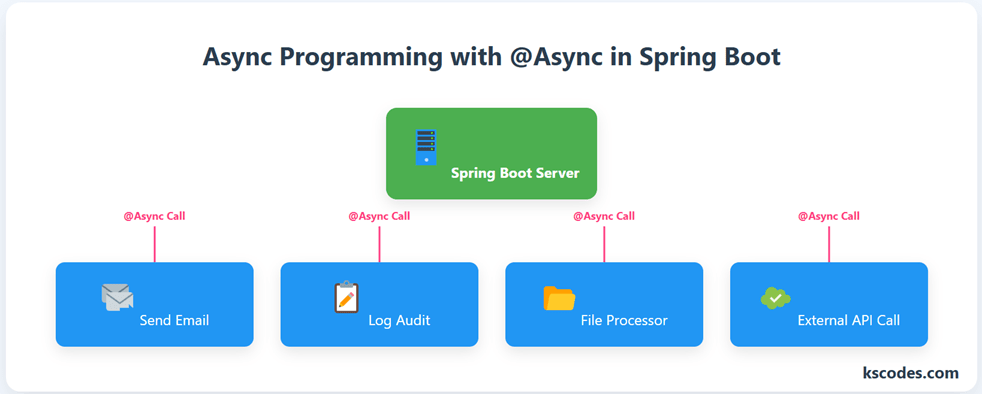
When you’re building responsive applications, especially REST APIs, blocking operations can slow down performance. Imagine sending emails, logging audit trails, or fetching third-party data — you don’t want your main thread to wait.
That’s where Spring Boot @Async programming comes in!
Using the @Async annotation, you can run methods asynchronously in a background thread, freeing up your main process and improving responsiveness.
In this guide, we’ll cover:
- How to enable and use
@Async - Return types like
void,Future, andCompletableFuture - Exception handling
- Real-world scenarios
✅ Step 1: Enable Async Support
To use @Async, annotate your configuration class or main class with @EnableAsync.
package com.kscodes.springboot;

import org.springframework.boot.SpringApplication;
import org.springframework.boot.autoconfigure.SpringBootApplication;
import org.springframework.scheduling.annotation.EnableAsync;

@SpringBootApplication
@EnableAsync
public class AsyncApp {
    public static void main(String[] args) {
        SpringApplication.run(AsyncApp.class, args);
    }
}
✏️ Step 2: Add a Method with @Async
package com.kscodes.springboot.service;

import org.springframework.scheduling.annotation.Async;
import org.springframework.stereotype.Service;

@Service
public class EmailService {

    @Async
    public void sendEmail(String to, String content) {
        try {
            Thread.sleep(3000); // simulate delay
            System.out.println("📧 Email sent to " + to);
        } catch (InterruptedException e) {
            Thread.currentThread().interrupt();
        }
    }
}
🚀 Step 3: Call the Async Method
package com.kscodes.springboot.controller;

import com.kscodes.springboot.service.EmailService;
import org.springframework.beans.factory.annotation.Autowired;
import org.springframework.web.bind.annotation.*;

@RestController
@RequestMapping("/notify")
public class NotificationController {

    @Autowired
    private EmailService emailService;

    @PostMapping("/send")
    public String sendNotification(@RequestParam String email) {
        emailService.sendEmail(email, "Welcome!");
        return "🟢 Request received. Email is being sent in the background.";
    }
}
Even though the email takes 3 seconds to send, the response is instant because it’s handled in a separate thread.
⏳ Async Return Types
✅ void
Best for fire-and-forget operations.
🧵 Future<T> and CompletableFuture<T>
Let you track the result later.
@Async
public CompletableFuture fetchData() {
    return CompletableFuture.completedFuture("Data Ready!");
}
Use .get() or .thenApply() to retrieve the value:
CompletableFuture result = service.fetchData();
System.out.println("Response: " + result.get());
⚠️ Exception Handling in @Async Methods
You must handle exceptions manually for void methods. For CompletableFuture, you can use .exceptionally():
@Async
public CompletableFuture riskyTask() {
    throw new RuntimeException("Boom!");
}
riskyTask()
  .exceptionally(ex -> {
      System.err.println("❌ Exception: " + ex.getMessage());
      return "Fallback";
  });
⚙️ Step 4: Custom Executor (Optional)
You can define your own thread pool:
@Configuration
public class AsyncConfig {

    @Bean(name = "taskExecutor")
    public Executor taskExecutor() {
        ThreadPoolTaskExecutor executor = new ThreadPoolTaskExecutor();
        executor.setCorePoolSize(2);
        executor.setMaxPoolSize(4);
        executor.setQueueCapacity(500);
        executor.setThreadNamePrefix("Async-Thread-");
        executor.initialize();
        return executor;
    }
}
Then use:
@Async("taskExecutor")
public void processHeavyTask() {
    // heavy logic
}
🧠 Real-World Use Cases
| Use Case | Description |
|---|---|
| Sending Emails | Background email dispatch after registration |
| Logging | Save logs/audits without blocking flow |
| API Calls | Call external APIs concurrently |
| File Processing | Parse large files without freezing UI |
| Notification Systems | Push messages without delay |
✅ Summary
Async Programming in Spring Boot is a powerful technique to boost application responsiveness and handle non-blocking operations. Whether it’s email notifications or third-party integrations, offloading them to background threads keeps your app fast and scalable.
In this tutorial, you learned:
- How to enable and use
@Async - Difference between
void,Future,CompletableFuture - Exception handling for async tasks
- How to use a custom executor
Use Async Programming in Spring Boot wisely to improve performance, especially for microservices and REST APIs.