As microservices communicate independently, securing them becomes critical. OAuth2 and JWT (JSON Web Token) are widely adopted for secure, scalable, and stateless authentication.
This guide walks through:
- What is OAuth2 and JWT
- Securing Spring Boot microservices with OAuth2
- Using JWT tokens for API access
- Sample architecture and code setup
📘 1. What is OAuth2 and JWT?
- OAuth2: An authorization framework that allows secure access to protected resources via tokens.
- JWT (JSON Web Token): A compact, URL-safe token format used to represent claims between two parties. Typically used in OAuth2 to represent the access token.
🏗 2. Microservice Security Architecture
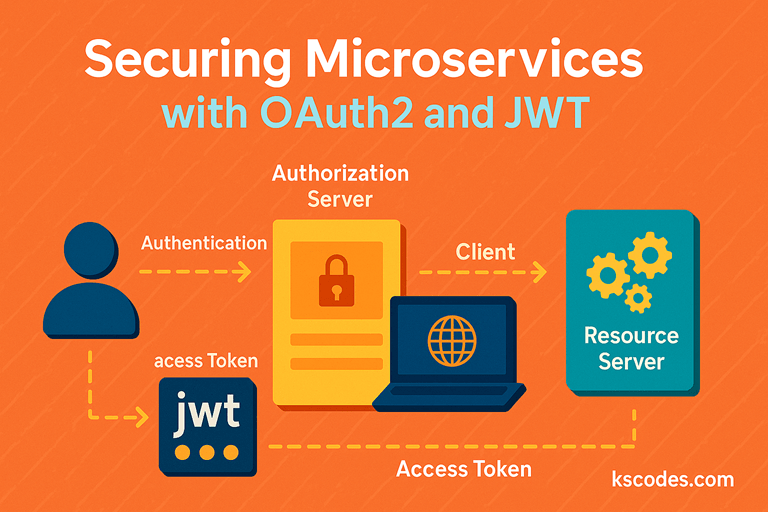
🔄 Architecture Flow:
- User authenticates with Authorization Server (e.g., Keycloak / Okta).
- Authorization Server issues a JWT access token.
- Client sends this token in HTTP headers when accessing microservices.
- Microservices validate the token and allow/deny access.
⚙️ 3. Add Required Dependencies
✅ pom.xml
    org.springframework.boot
    spring-boot-starter-oauth2-resource-server


    org.springframework.boot
    spring-boot-starter-security
📂 4. Project Package Structure
com.kscodes.springboot.microservice
│
├── config
│   └── SecurityConfig.java
├── controller
│   └── ProductController.java
└── Application.java
🔒 5. Resource Server Configuration
✅ SecurityConfig.java
package com.kscodes.springboot.microservice.config;

import org.springframework.context.annotation.Bean;
import org.springframework.context.annotation.Configuration;
import org.springframework.security.config.annotation.web.builders.HttpSecurity;
import org.springframework.security.web.SecurityFilterChain;

@Configuration
public class SecurityConfig {

    @Bean
    public SecurityFilterChain filterChain(HttpSecurity http) throws Exception {
        http
            .authorizeHttpRequests(auth -> auth
                .requestMatchers("/api/public/**").permitAll()
                .anyRequest().authenticated()
            )
            .oauth2ResourceServer(oauth2 -> oauth2.jwt());

        return http.build();
    }
}
🧾 6. application.yml Configuration
spring:
  security:
    oauth2:
      resourceserver:
        jwt:
          issuer-uri: https://auth-server.com/realms/kscodes
          jwk-set-uri: https://auth-server.com/realms/kscodes/protocol/openid-connect/certs
📦 7. JWT Token Format Example
Decoded JWT token:
{
  "sub": "john.doe",
  "preferred_username": "john.doe",
  "roles": ["USER", "ADMIN"],
  "iat": 1710000000,
  "exp": 1710003600
}
🧪 8. Sample Controller
✅ ProductController.java
package com.kscodes.springboot.microservice.controller;

import org.springframework.web.bind.annotation.*;
import java.security.Principal;

@RestController
@RequestMapping("/api/products")
public class ProductController {

    @GetMapping
    public String getProducts(Principal principal) {
        return "Hello " + principal.getName() + ", here are your products.";
    }

    @GetMapping("/public")
    public String publicEndpoint() {
        return "This endpoint is public and does not require a token.";
    }
}
🔐 9. JWT Authentication in Request
Client Call Example:
GET /api/products HTTP/1.1
Authorization: Bearer eyJhbGciOiJIUzI1NiIsInR5cCI6IkpXVCJ9...
Spring Security will automatically:
- Parse the JWT
- Validate its signature and expiration
- Populate the
Principalwith the claims
🧠 10. Role-Based Access Control (RBAC)
You can add fine-grained access control using Spring Security expressions.
.authorizeHttpRequests(auth -> auth
    .requestMatchers("/api/admin/**").hasRole("ADMIN")
    .anyRequest().authenticated()
)
📊 11. Token Generation (Using Keycloak)
If using Keycloak:
- Create a realm
- Register a client (set to
confidential) - Enable “Authorization” and “Direct Access”
- Use
client_id,client_secretto request a token:
curl -X POST http://localhost:8080/realms/kscodes/protocol/openid-connect/token \
  -H "Content-Type: application/x-www-form-urlencoded" \
  -d "client_id=myclient&client_secret=abc123&grant_type=password&username=john&password=123456"
✅ Conclusion
Securing microservices with OAuth2 and JWT in Spring Boot enables robust, scalable, and stateless authentication. It allows services to independently validate tokens, minimizing coupling and improving scalability.
🔑 With OAuth2 and JWT:
- APIs are protected
- Tokens are self-contained and verifiable
- Authorization can be role or scope-based