In a real-world Spring Boot application, it’s important to test how different components work together — services, controllers, repositories, and even security. This is where integration testing comes in, ensuring your application’s modules function as a cohesive unit.
Spring Boot simplifies integration testing with the powerful @SpringBootTest annotation. This guide will walk you through Spring Boot Integration Testing with @SpringBootTest, from configuration to writing meaningful test cases.
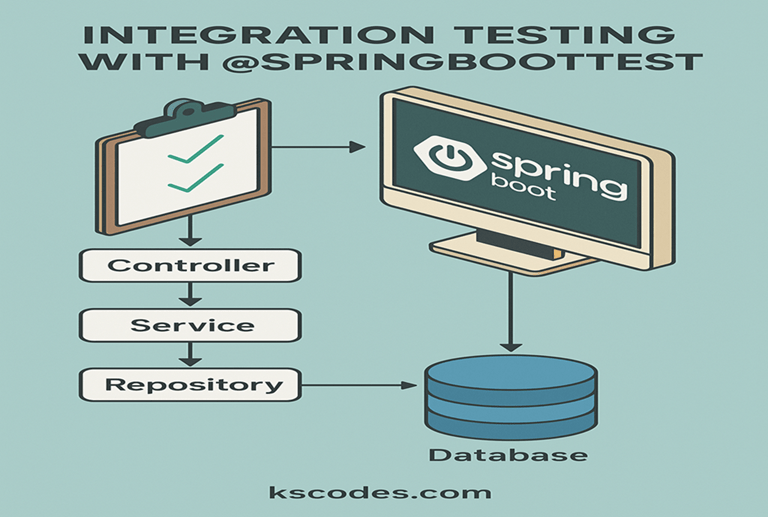
⚙️ What is @SpringBootTest?
@SpringBootTest tells Spring Boot to look for a main configuration class (e.g., one with @SpringBootApplication) and use that to start a full application context for the test.
This is ideal for:
- End-to-end tests
- Service + repository combinations
- Controller to DB flows
- Testing real HTTP requests
📦 Project Setup
Maven Dependencies:
Make sure the following dependencies are present in your pom.xml:
        org.springframework.boot
        spring-boot-starter-web


        org.springframework.boot
        spring-boot-starter-data-jpa


        org.springframework.boot
        spring-boot-starter-test
        test


        com.h2database
        h2
        test
📁 Sample Structure
com.kscodes.springboot
├── model
│   └── Book.java
├── repository
│   └── BookRepository.java
├── service
│   └── BookService.java
├── controller
│   └── BookController.java
└── test
    └── integration
        └── BookIntegrationTest.java
📘 Entity: Book
package com.kscodes.springboot.model;

import jakarta.persistence.*;

@Entity
public class Book {

    @Id
    @GeneratedValue(strategy = GenerationType.IDENTITY)
    private Long id;

    private String title;
    private String author;

    // Getters and Setters
}
📚 Repository: BookRepository
package com.kscodes.springboot.repository;

import com.kscodes.springboot.model.Book;
import org.springframework.data.jpa.repository.JpaRepository;

public interface BookRepository extends JpaRepository {}
🧠 Service: BookService
package com.kscodes.springboot.service;

import com.kscodes.springboot.model.Book;
import com.kscodes.springboot.repository.BookRepository;
import org.springframework.stereotype.Service;

import java.util.List;

@Service
public class BookService {

    private final BookRepository bookRepository;

    public BookService(BookRepository bookRepository) {
        this.bookRepository = bookRepository;
    }

    public List findAllBooks() {
        return bookRepository.findAll();
    }
}
🌐 Controller: BookController
package com.kscodes.springboot.controller;

import com.kscodes.springboot.model.Book;
import com.kscodes.springboot.service.BookService;
import org.springframework.web.bind.annotation.*;

import java.util.List;

@RestController
@RequestMapping("/api/books")
public class BookController {

    private final BookService bookService;

    public BookController(BookService bookService) {
        this.bookService = bookService;
    }

    @GetMapping
    public List getAllBooks() {
        return bookService.findAllBooks();
    }
}
✅ Integration Test with @SpringBootTest
package com.kscodes.springboot.integration;

import com.kscodes.springboot.model.Book;
import com.kscodes.springboot.repository.BookRepository;
import org.junit.jupiter.api.BeforeEach;
import org.junit.jupiter.api.Test;
import org.springframework.beans.factory.annotation.Autowired;
import org.springframework.boot.test.context.SpringBootTest;
import org.springframework.boot.test.web.client.TestRestTemplate;
import org.springframework.boot.web.server.LocalServerPort;

import java.util.List;

import static org.assertj.core.api.Assertions.assertThat;

@SpringBootTest(webEnvironment = SpringBootTest.WebEnvironment.RANDOM_PORT)
public class BookIntegrationTest {

    @LocalServerPort
    private int port;

    @Autowired
    private BookRepository bookRepository;

    @Autowired
    private TestRestTemplate restTemplate;

    @BeforeEach
    void setUp() {
        bookRepository.deleteAll();
        bookRepository.save(new Book(null, "Spring Boot Basics", "John Doe"));
    }

    @Test
    public void shouldReturnListOfBooks() {
        String url = "http://localhost:" + port + "/api/books";
        Book[] response = restTemplate.getForObject(url, Book[].class);
        assertThat(response).hasSize(1);
        assertThat(response[0].getTitle()).isEqualTo("Spring Boot Basics");
    }
}
🔎 Key Features of @SpringBootTest
| Feature | Description |
|---|---|
webEnvironment = RANDOM_PORT | Starts the embedded web server at a random port for HTTP testing |
@TestRestTemplate | Useful for sending real HTTP requests in tests |
| Full Spring Context | Loads beans, filters, configurations for realistic testing |
🧰 Best Practices
- Use
@SpringBootTestonly when you need full context. - For controller-only tests, prefer
@WebMvcTest. - Combine with Testcontainers if real DB testing is required.
- Use
@DirtiesContextif you want to reload context between tests (use cautiously). - Avoid mocking in
@SpringBootTestunless necessary — it’s meant for real integration.
📚 Summary
In this article, we explored Spring Boot Integration Testing with @SpringBootTest, including:
- When and why to use
@SpringBootTest - Setting up real HTTP-based tests using
TestRestTemplate - Testing controller-service-repository flow
- Best practices to keep tests fast and reliable
Spring Boot Integration Testing with @SpringBootTest helps you verify that all layers of your application work seamlessly together, ensuring confidence before deployment.